Your request rate looks normal, but memory keeps climbing. Restarting the MCP server clears it. Then the same pattern returns.
Start by asking which work survives a request, and which single request can become much larger than it looks.
Four places to investigate
| Symptom or design | Relevant advisory | Budget to inspect |
|---|---|---|
| A log request materializes a large result | Kubernetes MKP | Output bytes and downstream fetch cost |
| URL reads grow without Content-Length | mcp-searxng | Bytes consumed while streaming |
| Invalid initialization leaves sessions behind | RMCP Rust SDK | Retained state and cleanup |
| Streamed output accumulates in memory | MCP PHP SDK | Response buffers and stream duration |
These are four distinct flaws. Their common operational feature is asymmetric cost: cheap caller input causes expensive server work.
Inspect allocation before tuning request limits
A requests-per-minute limit helps with volume. It says little about an allowed request that fetches a huge response or creates state that is never released.
Measure active sessions, retained tasks, response buffers, decoded bytes, and downstream work. Where possible, attribute them to the caller and tool. Keep strict global limits as well, so unauthenticated traffic cannot exhaust resources before a principal exists.
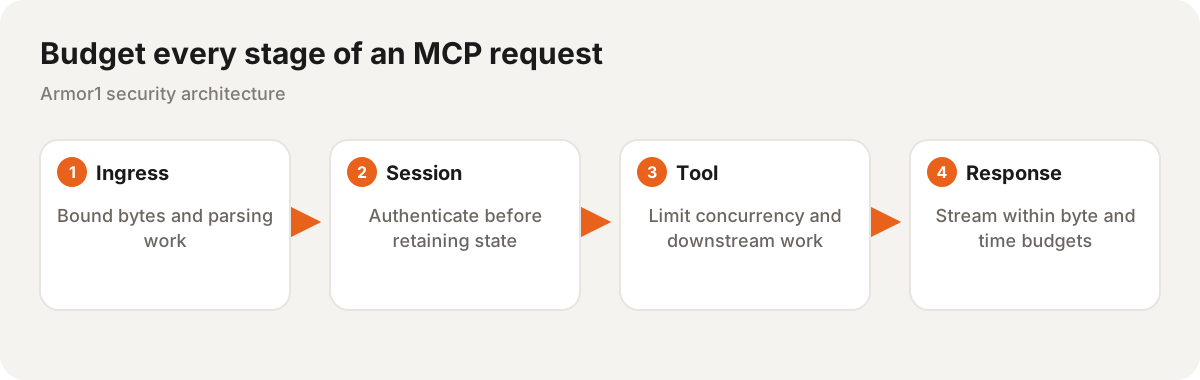
Each stage needs its own ceiling. A small input can create a large downstream response.
Put the limit inside the operation
Reject an oversized declared body before reading it. Also enforce a streaming byte limit because a caller can omit or misstate its length.
Apply the same rule to tool responses. Checking the length after response.text() has already allocated the full body. Bound both encoded and decoded data where decompression or transformation can amplify it.
Add timeouts and concurrency caps. A byte budget does not stop a very slow stream from tying up connections.
Watch cleanup after rejection
Exercise initialization failures, disconnects, timeouts, cancellation, and normal completion. Every path should release its resources. Session and task counts should return toward baseline rather than growing with each failed attempt.
Use a controlled load test and watch the process over repeated cycles. An HTTP error can be correct while its abandoned session remains in memory.
Fix the affected component version, then repeat the test against the deployed process. A dependency update is complete only when the running service demonstrates the intended bounds and cleanup.